
Well what do we have here? The still-unreleased and long-awaited Bitwig Studio. From their website, “Bitwig Studio is a music creation system for production, performance and DJing, with a focus on flexible editing tools and a super-fast workflow”. But I feel like I’ve seen this before. Oh yes… maybe that’s because I use Ableton Live 8, and I would use the exact same description for Live. But words don’t say much to those who’ve never used it.. so just look at these pictures:
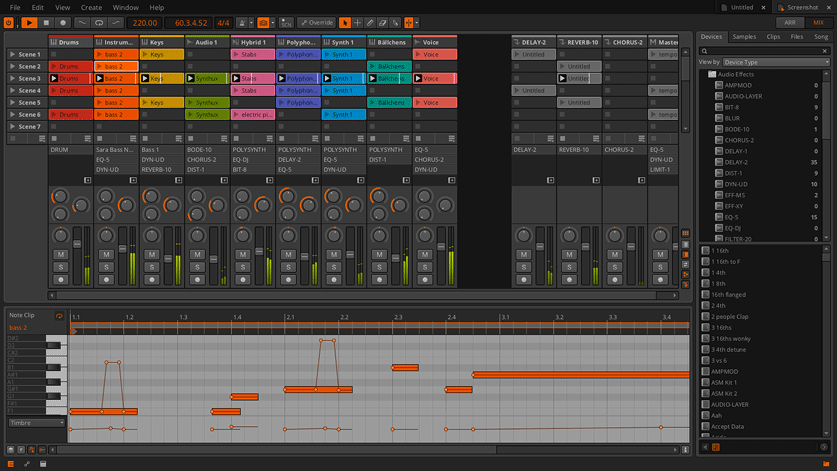

and Ableton Live 8
If you’ve never used Live, and are interested in what sets it apart from other music programs, read the following passage. Or skip it to cut to Bitwig vs. Live 9.
what sets Live apart from other music programs is its unique approach to displaying the musical elements of your song. Most programs feature only an Arrangement view where one block of Audio or MIDI notes is put after another from left to right in its corresponding track or instrument lane. Ableton Live, first released in October 2001, changed that with “Session view”. Look at the picture directly above. the colored rectangular boxes (surrounded in red) are called clips. Click a clip’s play button, or press the clip’s assigned midi control, (a keyboard key, drum pad, etc..) to trigger the clip. Further to the right in the picture are your scenes. Trigger a scene’s play button to trigger all of the clips in the corresponding horizontal row. And if you turn Record on, then trigger a clip or scene, it will record the clip’s audio or midi notes directly into it’s track’s lane in your song’s Arrangement view. Live users can easily switch back and fourth between Session and Arrangement view. The workflow possibilities are endless.

So now, after 11 years of standing out as the only DAW (Digital Audio Workstation) to function in this way, it looks like competition has arrived. The question is… has it?
Let’s compare the unique features of Live 9 and Bitwig Studio 1.0, both unreleased, and see which program looks more worthwhile. If both programs offer the same feature, then you won’t find it in the list below.
Lets start with Bitwig:

A Clip launcher from both Session and Arrangement View

Basically, you can view and drag in your clips while editing your timeline-based arrangement. Pretty cool. Doesn’t make me want to switch over though.
Hybrid Tracks

Why would I want to create a track that accepts both Audio and MIDI? I suppose to save visual space in session or arrangement view. Still, Live lets you easily create a group track from multiple tracks, which you can fold and unfold to save screen space. You can then apply effects to the group track so as not to use up CPU duplicating the same effects unit. I think I’ll stick to having just Audio and MIDI track types thank you.
Audio Clips can Hold Multiple Audio Events

Ok, now we’re talking. So you’re saying that one audio clip can contain multiple different audio files or repetitions of the same file, which can each be independently time stretched? That would be a bit of extra work in Live without using a MIDI device to trigger different samples.
Pitch via Note
 Probably the most attractive feature of Bitwig Studio. In Live 8, Pitch bending a note means creating an automation lane to control the entire tracks pitch. If you alter the tracks pitch, it alters the pitch of all notes being triggered during the set pitch bend. In Bitwig, they allow you to directly bend the pitch of each note, including the individual notes of a chord. So a sustained chord can be morphed into other chords by individually re-pitching each note over time. Not only that, but they let you modify each note’s pan, and timbre individually as well. Ableton, get on this.
Multiple Track Editing

in Bitwig, you can view the MIDI and Audio events of multiple different tracks at once. Each track’s notes retain the same color as the one assigned to their hosting clip or track, so that you can recognize which track is playing what notes.
Open Multiple Documents
No picture needed. Bitwig will allow you to have multiple documents open on the screen at once, so that you can drag and drop elements of your already created material into your current project. Live 8 lets you do this via the very handy, built-in file browser, and from my experience working in Logic 9 and Reason, having multiple documents open at once is a pain in the butt.
also new and unique to Bitwig is Native Linux support and A resizable clip matrix
After the 1.0 Release
There are features on the Bitwig Website that will not be released until after the 1.0 release. Here is a picture of them:

It would be pretty cool to call up your friend and collab on the same music file simultaneously over the internet.
Thats everything I could find about Bitwig that seems truly original. if you’re curious about Bitwig’s arsenal of effects, check out this video. After viewing it, I can’t say any of their effects appear to do anything unique to what Live’s devices offer. Most of BW’s FX have just been given slightly different names while keeping a nearly identical parameter layout.
Now lets move on to the new features of Live 9

Curved Automation

A small but beneficial improvement. Any automation can now be given a draggable curve to make your effect fade-ins sound just right, and your sound shaping morphs extra smooth.
Consolidate Time to Scene

I really like this one. This new feature allows you to highlight a selection of time from your arrangement view and with two clicks, send all of the notes and audio in that timeframe into clips that rest in their own scene in session view, all ready to be triggered via the scene’s play button. (Below is the newly consolidated scene from the above picture)

Improved Browser

Smooth workflow is so important. But rarely are we free from constant sound searches and missing or lost presets. Although no program can eliminate these problems completely, the way Live 9’s built-in file browser functions will seriously improve the way you organize your own custom presets and find just the sound you’re looking for. If you want a Bass sound, but only one that is created by a specific Live synth you are familiar with, it will be very easy to search for exactly that.
Improved MIDI Editing

There’s a lot to talk about on this. It would be easier if you watched this quick video by Ableton if you’re interested. But I will point out the “Note Stretch” feature. Basically, in the same way one would time stretch the transients of an audio clip, you can time stretch a selected region of MIDI notes in your midi clip. This can come in handy if you accidentally write your midi notes in the wrong time signature, and should have plenty of other creative uses as well.
Audio to MIDI
Here comes the controversy. Imagine beat-boxing into a mic, and then having your software create a line of midi based on the Kicks, Snares, and Hi-Hats that you just vocalized into the mic. Yup. The future is now. and whether your reaction is “Wow, how cool!” or “Omg.. just, Stop.” depends on a couple of different things. For those of us who have long been writing beats using a keyboard, draw tool, drum pad, etc.. well, many users may feel that this new feature takes away our edge on the competition. So now anyone with a semi-creative mind can just beatbox their musical thoughts into the mic and ta-da, the drums are ready to be edited. I’d like to hear your thoughts on this if you’ve read along this far. So please feel free to post your opinion in the comments.
Now in a slightly less controversial light, you can also play any real instrument, whether it be a series of guitar chords, or a melodic phrase on a flute, and Live 9 will find the notes and harmonies played, converting them into MIDI. So if you can play your instrument well and you’d like to capture the same melody into your DAW, Live 9 has got your back. This should be great for doubling a recorded instrument’s audio with a synthetic instrument’s midi notes. Check out this video for the mind blowing footage.
Re-designed Studio Effects
If I wrote in detail about this, it would sound like I’m advertising. So if you’re interested in the improvements Live 9 will add to it’s FX units, check it out here.
and finally.. drumroll please..
Ableton Push

64 Pads.. “Push is a new instrument that solves an old problem: how to make a song from scratch. With hands-on control of melody and harmony, beats, sounds, and song structure, Push puts the fundamental elements of music making at your fingertips – and it fits in a backpack alongside your laptop.”
Words dont say enough here. Watch Ableton’s Video. It may have you drooling on your keys though, right A MAC?
All good things come with a price. $600. Not too bad. Kinda makes me want to trade in my NI Traktor S4. I really do.
Now although Ableton created this product, it wouldn’t surprise me at all if Bitwig can be programmed to work nearly seamlessly with the controller using a bit of Javascript coding. According to the Ableton forums, four members of the Bitwig Team are actually ex-Ableton employees.
All in all, both softwear programs have some unique features to provide you with, and both share what is arguably the best music making technology in the market today. You dont think so? Post in the comments!
The bigger question is, which softwear would you rather have and why? I do hope you post on this, and feel free to be as general or specific as you please. Thanks for reading!

